Professional Wireless Internet Signal Booster for Your Computer

Although the strength of wireless Internet networks has dramatically increased over the past few years there can still be times when these signals cannot be detected. As opposed to enduring frustrating connections and increased download times why not use Easy WiFi Radar? This unique booster kit is able to increase the strength of your signal by up to six times perfect for weaker connections.

Features and Functions

Easy WiFi Radar utilises an ultra-sensitive antenna to detect and strengthen the wireless signal within a specific area (such as the home or the office). Interestingly enough it does not boost the signal emitted from the wireless router. It instead utilises proprietary software to enhance the signal interpreted by the computer. Additional hardware includes a 15-foot (4.6-metre) coaxial cable than can be plugged into your USB port.

Better Signal Strength

The software provided by Easy WiFi Radar is also able to analyse your current signal strength and help you to diagnose any potential problems within your network. As the cable will plug directly into your computer and no router connection is required this is also a great option when travelling or if you find yourself within a public area with poor coverage.


  • Pros

    • The Easy WiFi Radar software package can be quickly installed onto your computer.
    • The addition of a cable provides superior levels of flexibility.
  • Cons

    • Slower operating systems may not experience the wireless boost required.
    • It might not be possible to boost extremely poor wireless signals or those obscured by objects such as thick walls.
 0/1

App specs

  • License

    Free

  • Version

    1.0.5

  • Latest update

  • Platform

    Windows

  • OS

    Windows 2000

  • Language

    English

  • Downloads

    1.2M

    Last month's downloads

    • 45
  • Size

    2.24 MB

  • Developer

Program available in other languages


User reviews about Easy WIFI Radar

3.2

9 reviews

Add review

Main reviews for you

  • Anonymous user

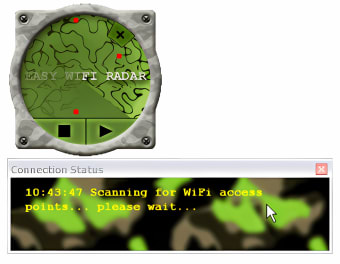
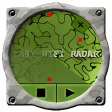
    Works Great in XP...not in Vista/7. It's not exactly what you think looking at it running. It may resemble a radar screen, but it only shows strength. But is easy to use, fairly accurate, and helps to connect to the strongest wifi. Pros: Works as advertised...in Windows XP Cons: Doesn't work in Windows Vista/7

  • Anonymous user

    Win7 Compatability it still will nto function I have tried all XP settings. Tried all comptability settings through XP to ME still no results I am still searching for a ver that will function with Win7 also.

  • Anonymous user

    Does not work in Windows 7. I used this program in XP and it worked great, however I now have a new computer with Windows 7 and it won't even start. Unless they come out with a Win7 version, don't bother. If not for this negative I'd have given it an overall rating of 8.In XP it does a good job of finding multiple networks within range, and connecting, although the interface is just eye candy. It did do a better job at times than the Windows wireless utility and it looks pretty cool, but other than that, it's unnessary, IMO. Pros: Cool looking and SOMETIMES works better than Windows XP networking utility. Cons: Doesn't work in Windows 7

  • Anonymous user

    Easy wifi. hi.. i have this easy wifi in my iphone,, it's a great apllication i can find a wifi spot,, thanks :) urmm.... well maybe you cannot use it well in laptop ( since it might destroy your laptop) well thanks again easy wifi

  • Anonymous user

    The best inovation!. I am very contented with your amazing radar! To answer the other queries here.. you cannot connect if you do not have a wifi usb connected to your computer evidently. If you do have a usb the wifi radar will scan & you can choose your connection then it automatically remembers that which you are happy with! Enjoy your internet surfing!

  • Anonymous user

    Blue screen. It crashed my Asus EPC (on XP) and now I am trying to save my laptop as it won't restart properly. Blue screen every time. Pros: none Cons: now I have to save my laptop

More

You may also like

Alternatives to Easy WIFI Radar

Explore Apps

Latest articles

Laws concerning the use of this software vary from country to country. We do not encourage or condone the use of this program if it is in violation of these laws.

Softonic

Is Easy WIFI Radar safe?

Score result: Clean

This file passed a comprehensive security scan using VirusTotal technology. It is safe to download.

  • Virus free
  • Spyware free
  • Malware free
  • Verified by Security Partners

    VirusTotal logo

Scan Info

Last scan
Wednesday, December 2, 2020
Scan provider
VirusTotal

Softonic security commitment

Easy WIFI Radar has been thoroughly scanned by our advanced security systems and verified by industry-leading partners. This file comes from the official developer and has passed all our security checks, showing no signs of viruses, malware, or spyware. For more information, visit our Security and Trust Center